Mastering Your Next Project with a Perfect Horse SVG
There is a distinct joy in watching a cutting machine bring a digital design to life, especially when that design captures the whimsical charm of a layered cute horse. Whether you are preparing for a baby shower, crafting a personalized birthday gift, or simply looking to add a touch of warmth to a nursery wall, these designs offer endless possibilities. However, the difference between a professional-looking finished product and a frustrating pile of wasted vinyl often comes down to how you select, prepare, and cut your files. While the promise of a design that "cuts like a dream" in both Cricut Design Space and Silhouette Studio is appealing, achieving that result requires more than just clicking download. It demands an understanding of file formats, layer management, and the specific needs of your material.
Understanding the Value of Layered Designs
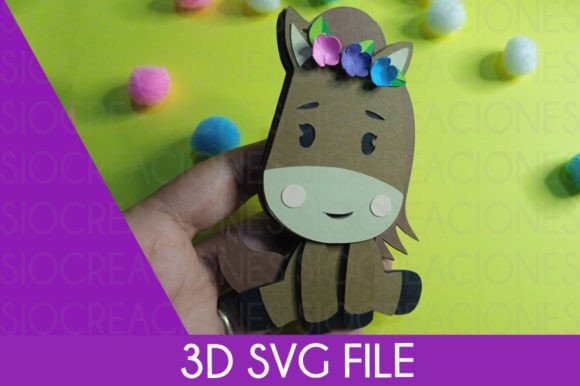
When you search for a Horse SVG, you will encounter two primary types: single-layer silhouettes and multi-layered compositions. For projects intended to have depth, texture, or multiple colors, the layered approach is superior. A layered cute horse typically separates the body, mane, tail, eyes, and decorative elements into distinct groups. This separation allows you to use different materials—perhaps a soft pastel cardstock for the body and a shimmering metallic vinyl for the saddle.
The mistake many beginners make is assuming all SVGs are ready to cut immediately upon import. In reality, a high-quality layered file requires you to understand how your specific software handles grouping. If you do not ungroup and regroup elements correctly before sending them to the mat, you risk misalignment. For instance, if the layers are not sized proportionally during the design phase, you might find that the horse's eye is too large for its head once cut. Always preview your layers in the software's canvas view before committing to a cut. This simple check saves material and ensures the final assembly looks cohesive rather than disjointed.
Navigating File Formats and Compatibility
One of the most common points of confusion arises from file extensions. You may see listings that mention ".Studio3" alongside standard SVGs. It is crucial to understand what you are buying. An SVG (Scalable Vector Graphics) is a universal format compatible with almost all major cutting machines, including Cricut and Silhouette. However, a .Studio3 file is native to Silhouette Studio version 3 and above. While Silhouette users can open these directly with layers intact, Cricut users cannot open .Studio3 files at all; they rely exclusively on the SVG version.
A frequent error occurs when purchasers buy a bundle expecting universal compatibility without checking the included formats. If a listing only provides a .Studio3 file and you own a Cricut, you will be unable to use the design unless you have access to Silhouette software to convert it—a tedious and often imperfect process. Before making a purchase, always verify that the package includes a true Horse SVG if you are a Cricut user. Furthermore, ensure the seller provides the files in a compressed .zip format. This is industry standard for protecting vector integrity during download. If you receive loose files or a non-standard archive, it may indicate a lack of professionalism or potential corruption in the data.
The Critical Step of Uncompressing Files
It sounds trivial, but one of the most overlooked steps in the crafting workflow is properly uncompressing the downloaded file. Many users attempt to drag and drop the .zip folder directly into their design software. This rarely works as intended. The software needs access to the actual vector files inside, not the container they arrived in. You must extract or unzip the folder first. On Windows, this usually involves right-clicking the folder and selecting "Extract All." On Mac, double-clicking the zip file typically expands it automatically.
Failing to do this can lead to frustration where the design appears missing or corrupted. Additionally, keeping your extracted files organized in a dedicated folder on your computer prevents the chaos of searching through your "Downloads" directory months later when you want to recreate that adorable horse decor. Organization is a hallmark of an efficient creator; treating your digital assets with the same care as your physical tools streamlines your entire creative process.
Avoiding Common Cutting and Assembly Pitfalls
Even with a perfect file, the physical cutting process can introduce errors if not managed correctly. A "cute horse" design often features intricate details like eyelashes, small hooves, or delicate mane strands. These fine lines are susceptible to tearing if the blade pressure is too high or if the material is not secured firmly to the mat. A common misconception is that a sharper blade or higher pressure always yields better results. In truth, gentle pressure with a fresh, fine-point blade often produces cleaner cuts for detailed SVGs.
Another area where crafters stumble is the weeding and assembly phase. With layered designs, the order of operations matters. You should generally weed (remove excess material) from the background layers first, then apply transfer tape, and finally align the subsequent layers. Rushing this alignment is a recipe for disaster. If the layers of your horse are off by even a millimeter, the character loses its charm and looks amateurish. Use the registration marks or grid lines in your software to help visualize the stacking order before you cut. Some designers even include a visual guide image within the zip file; take a moment to review this reference before you start gluing or sticking.
Choosing the Right Materials for the Job
The versatility of a Horse SVG means it can be applied to various surfaces, but not all materials behave the same way. For a baby's room decoration, safety and durability are paramount. If you are using adhesive vinyl on a wall, ensure it is removable and non-toxic. If you are creating a plush toy or a fabric banner for a baby shower, remember that SVGs designed for paper or vinyl may need slight adjustments when cut from fabric. Fabric tends to fray, so very thin lines in a layered horse design might not hold up well unless you use a stabilizer or choose a slightly thicker variation of the design.
Entrepreneurs selling these crafts must also consider the end-user. A design that looks stunning on cardstock might be difficult for a customer to assemble if the pieces are too small or fragile. When evaluating a design for commercial use, ask yourself: Is this easy for a beginner to put together? If the answer is no, you might need to simplify the layers or provide detailed assembly instructions to your customers. This level of foresight distinguishes a hobbyist from a professional business owner.
Making an Informed Purchase Decision
Before you finalize any transaction for a digital cut file, take a moment to evaluate the listing beyond the preview image. Look for evidence that the design has been tested. Phrases like "tested in Cricut Design Space and Silhouette Studio" are good indicators, but look for user reviews that confirm this. Did other buyers mention clean cuts? Were the layers grouped logically? A well-structured file will have named layers (e.g., "Horse Body," "Mane," "Eye"), which makes editing significantly easier. If the layers are unnamed or grouped haphazardly, you will spend more time fixing the file than crafting with it.
Additionally, consider the license terms. Are you buying this for personal use only, or does it include a commercial license? If you plan to sell items made with this layered cute horse, you must have the explicit right to do so. Ignoring licensing agreements can lead to serious legal and financial repercussions for small business owners. Reputable sellers clearly state their terms in the product description or within the downloaded documentation.
Ultimately, the goal is to enjoy the creative process. By paying attention to file formats, properly managing your downloads, respecting material limitations, and choosing high-quality, well-tested designs, you ensure that your final project is as delightful as the initial inspiration. Whether it is a gift for a new parent or a piece of decor for your own home, a little preparation goes a long way in transforming a digital Horse SVG into a cherished physical keepsake.